Ersa
Ersa: Keys · For Mac
Play chords from your Mac keyboard.No MIDI keyboard needed.
Ersa: Keys turns the keyboard you type on into a chord instrument. Your right hand plays the chords of your key, your left hand colours them, and Ersa: Keys sends the result to your music app as MIDI.
Coming soon to the Mac App StoreMac app and AUv3 MIDI plug-in · macOS 14 or later
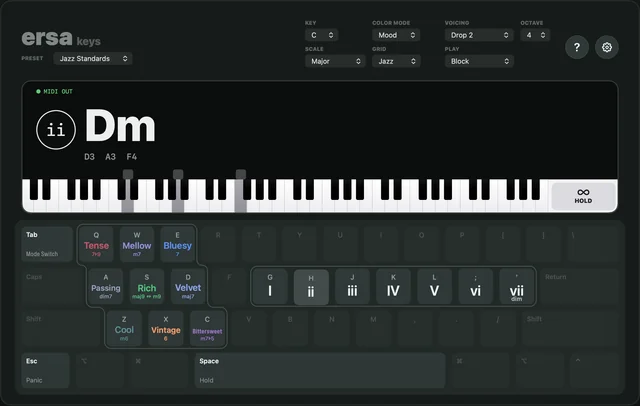
Right hand · Left hand
Two hands, whole progressions.
The home row plays your key.
Seven keys play the seven chords of the key you choose, from I to vii. A chord sounds for as long as you hold its key. Change key and scale at the top of the window.
Block, strum or arpeggio.
Play every note at once, sweep the chord like a guitar, or let its notes loop in time with the tempo you set.
Choose how chords are voiced.
Pick a voicing such as Drop 2 or a rootless jazz position, shift it up or down, or shape your own. Ten presets set up a style in one step.
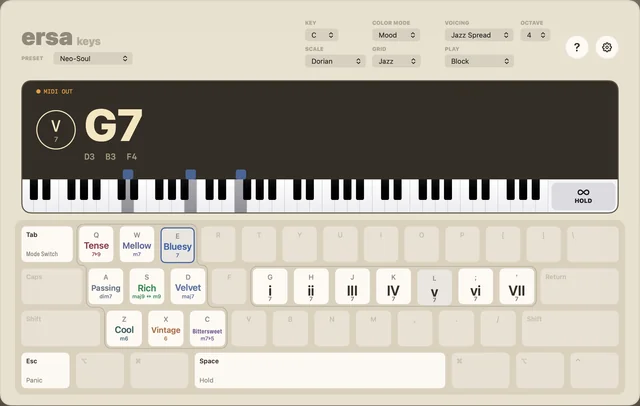
Your left hand colours the chord.
Hold a Mood key such as Mellow, Bluesy, Tense or Vintage while you play, and the chord becomes a seventh, a ninth, a sus chord and more. Each key shows the chord type it makes.
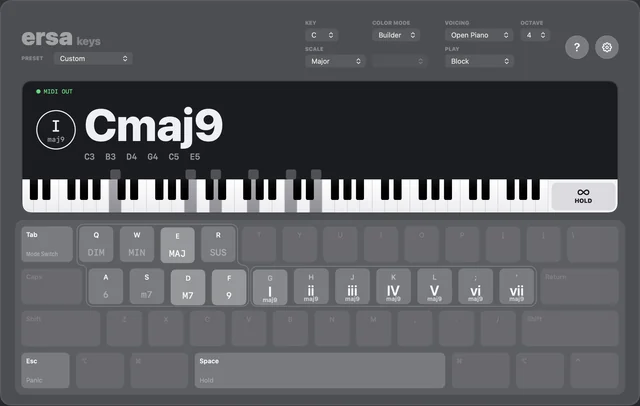
Or build the exact chord.
Press Tab to swap Mood for Builder. Pick a chord type, add extensions such as 6, 7 and 9, then play any degree of the key.
Getting sound
It plays the instruments you already have.
Ersa: Keys makes no sound itself. It sends chords as MIDI, so they play whichever instrument you choose in your music app.
As an app
Ersa: Keys appears as a MIDI input called “Ersa Keys”, with no driver or extra routing to set up. Choose it as the input of an instrument track in a music app that accepts MIDI input.
As a plug-in
The AUv3 MIDI effect goes in the MIDI effect slot of an instrument track and plays that track. It needs a host that loads Audio Unit MIDI effects.
- Made for
- Mac
macOS 14 or later - Two ways to use it
- App and plug-in
Virtual MIDI output and AUv3 MIDI effect - Your own sounds
- MIDI only
A music app or instrument is required to hear chords
A few useful answers
Before your first chord.
Do I need a MIDI keyboard?
No. Ersa: Keys is played from your Mac’s own keyboard. It only hears the keyboard while its window is in front.
Does Ersa: Keys make sound on its own?
No. It sends MIDI notes to another app, which makes the sound. You need a music app or instrument that accepts MIDI input.
Which music apps does it work with?
The app sends MIDI through a virtual output, so it is meant for music apps that can take MIDI from one. The plug-in needs a host with Audio Unit MIDI effect slots, which not every music app has. Check how your music app handles MIDI input before you buy.
Is Ersa: Keys the same as Ersa: Chord Machine?
No. They are separate products. Ersa: Chord Machine is a chord synthesizer and looper for iPhone and iPad with its own sounds. Ersa: Keys is a Mac chord controller that plays other instruments over MIDI.
When can I get it, and what does it cost?
Ersa: Keys is coming to the Mac App Store. Its listing will show the price in your region.
On iPhone or iPad?
Ersa: Chord Machine is a chord synthesizer and looper you play by touch, with its own sounds. The App Store shows the current price and compatibility for your device.