 Ersa
Chord instrument comparison
Ersa vs Orchid.Two ways to explore harmony.
Ersa is an iPhone and iPad option for exploring chord progressions, voicings and short loops. Telepathic Instruments Orchid offers a dedicated keyboard, chord buttons and voicing dials. Both help you discover harmony; the playing experience and sound are their own.
Touch controls meet physical keys.
| Feature | Ersa | Orchid |
|---|---|---|
| Instrument | App for iPhone and iPad, using your device’s screen and audio output. | Hardware chord synthesizer with a one-octave velocity-sensitive keyboard and stereo speakers. |
| Choosing chords | Chord pads, key and scale selection, Color Wheel and Chord Builder. | Root-note keys with chord-type and modifier buttons; a Key Mode for chords within a chosen key. |
| Voicings | Touch controls and voicing choices, with Keyboard, Strips and Octave Grid surfaces. | Physical voicing dials for moving through chord inversions and register. |
| Sound & motion | Built-in pianos, guitars, synths and pads; effects, strums, arpeggios, patterns and bass accompaniment. | Built-in synthesis, effects, performance modes and a dedicated bass engine. |
| Looping | Up to eight tracks of short loops, about 20 seconds per loop, with track volume and mute controls. | Loop recording and overdubbing, with tempo-synced and free-length modes. |
| Drums | No built-in drum machine. | Onboard drum features; check the current firmware. |
| MIDI | Note output to compatible apps, DAWs and MIDI equipment; a compatible connection and destination are required. | MIDI output can separate performance, bass and chord information onto different channels. |
| Price | Paid app. Check your local App Store price; an iPhone or iPad is required. | Manufacturer lists US$649. Check regional pricing and availability. |
Orchid specifications: the manufacturer’s product page, looping guide and MIDI guide. See the firmware notes for updates. Prices and features can change.
A familiar chord can go somewhere new.
A chord’s identity is only part of its sound. Changing the notes you add, their order or their spacing can make the same progression feel different. Ersa gives you several ways to explore those choices by touch.
Start with a chord pad and move around the Color Wheel to change its character. Chord Builder gives you explicit chord types and extra notes. Voicing settings let you explore how the notes are arranged, while strums, arpeggios and patterns change how they arrive.
Orchid centres the interaction on a root-note keyboard, chord buttons and voicing dials. If physically turning a control while holding keys is what draws you to Orchid, that is a meaningful reason to choose the hardware.
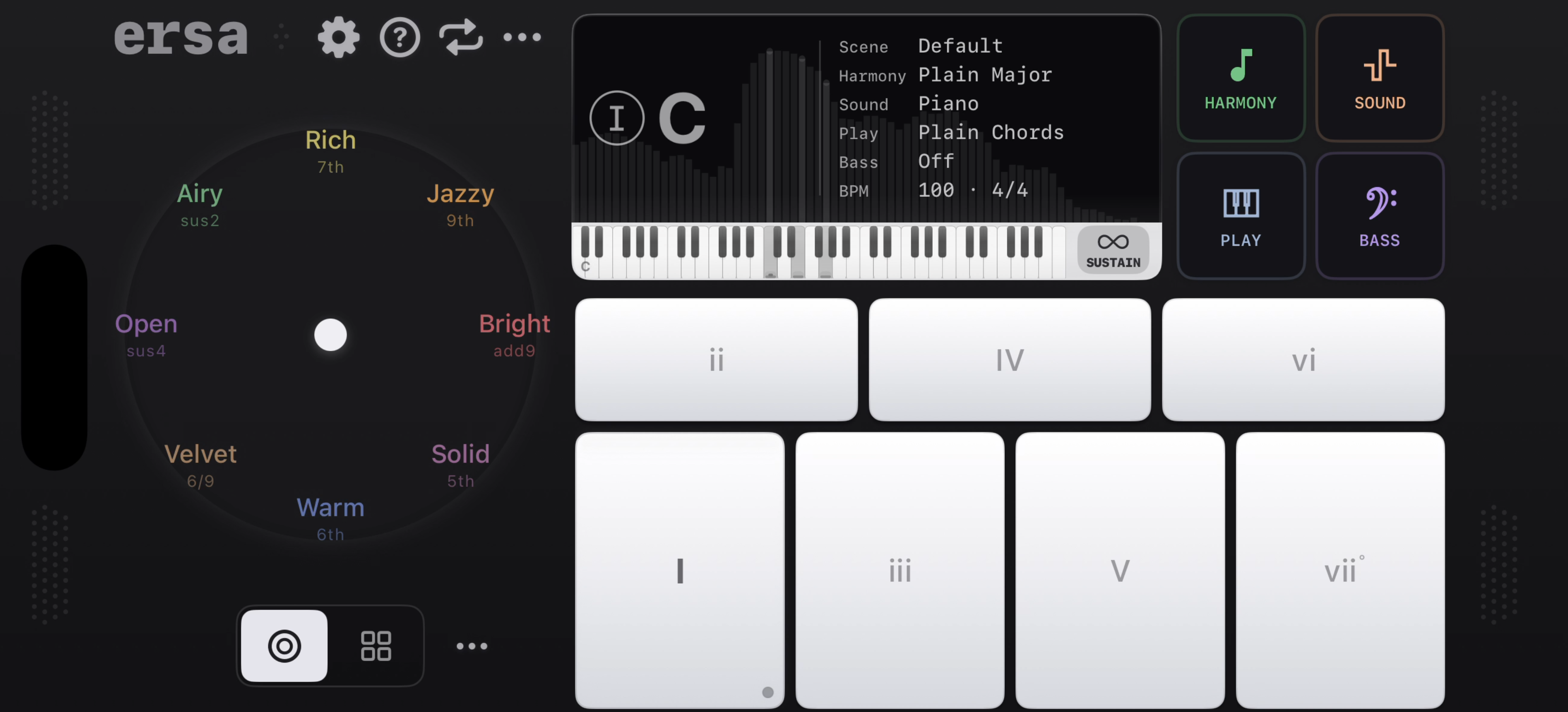
Try a progression three ways in Ersa
- Choose a key and sound, then play a short progression on the chord pads.
- Return to those pads with a different Color Wheel position or voicing.
- Try a strum or arpeggio, then record the variation you want to keep.
Ersa is useful for short, layered sketches: its loops are limited to about 20 seconds. When comparing loopers, consider the length you need and how you prefer to record, overdub and control parts.
Choose the interaction that invites you to play.
Consider Ersa if…
- You want to explore chord ideas on an iPhone or iPad you already own.
- You enjoy touch controls and changing between different playing surfaces.
- You want the Color Wheel, Chord Builder and short layered loops in one app.
Consider Orchid if…
- You want physical keys, chord buttons and voicing dials.
- You prefer a dedicated instrument in your music-making space.
- Orchid’s own sounds and hardware workflow are what interest you.
Common questions.
Is Ersa an Orchid app or emulator?
No. Ersa is an independent instrument made by Retropaste. It is not affiliated with Telepathic Instruments, and it does not emulate Orchid’s sound engine or use its presets.
Can Ersa be an alternative to buying Orchid?
It can be an option if your aim is to explore chords and capture short musical ideas on a device you already own. If Orchid’s physical controls or particular sound are the reason you want it, try that instrument before deciding an app meets the same need.
Can Ersa control other instruments?
Ersa can send MIDI notes to compatible destinations. You need a suitable connection and a receiving app, DAW or MIDI instrument. This is not a claim of tested compatibility with every device, including Orchid.
Does Ersa work on iPad?
Yes. Ersa supports iPhone and iPad with iOS or iPadOS 17 or later. Check the App Store compatibility information for your device.
Follow the next chord.
Explore Ersa on iPhone and iPad. The App Store shows the current price and compatibility for your device.

Looking for a smaller hardware instrument? Read Ersa vs HiChord.