 Ersa
Chord instrument comparison
Ersa vs HiChord.Your phone, or a dedicated instrument?
Ersa is an iPhone and iPad alternative to consider if you want one-touch chords, sound shaping and short loops. HiChord suits players who want a separate instrument with physical buttons, a joystick and its own speaker. The choice starts with how you want to play.
Two ways into a chord progression.
| Feature | Ersa | HiChord |
|---|---|---|
| Instrument | App for iPhone and iPad, using your device’s screen and audio output. | Standalone pocket hardware with a speaker and rechargeable battery. |
| Playing controls | Chord pads, Keyboard, Strips and Octave Grid touch surfaces. | Seven chord buttons, function buttons and a joystick. |
| Harmony | Key and scale selection, Color Wheel, Chord Builder and voicing choices. | Key and scale selection, chord types, inversions and joystick modifiers. |
| Sound & motion | Built-in pianos, guitars, synths and pads; effects, strums, arpeggios, patterns and bass accompaniment. | Built-in sounds and effects; chord, strum, arpeggio and drum modes, among others. |
| Looping | Up to eight tracks of short loops, about 20 seconds per loop, with track volume and mute controls. | Six-track synchronized looper. |
| Drums | No built-in drum machine. | Built-in drum machine. |
| MIDI | Note output to compatible apps, DAWs and MIDI equipment; a compatible connection and destination are required. | USB-C MIDI input/output and Type A TRS MIDI output. |
| Price | Paid app. Check your local App Store price; an iPhone or iPad is required. | Manufacturer lists US$320. Check the current price and shipping for your region. |
HiChord specifications: Pocket Audio’s product page and HiChord manual. Prices and firmware features can change. Ersa’s loop count describes short audio layers; track counts alone do not describe an equivalent recording workflow.
Start with a chord. Change its character.
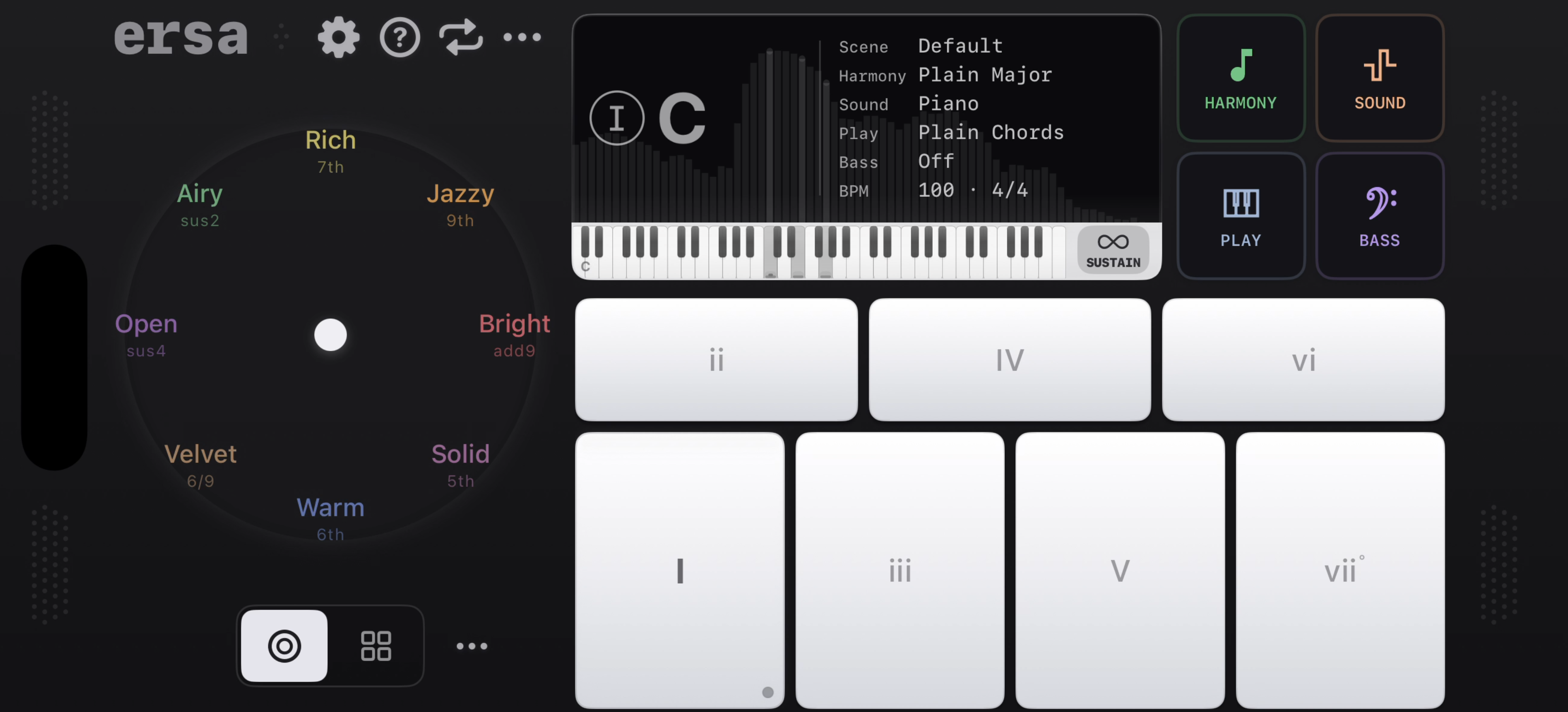
The shared idea is simple: choose a chord without having to finger every note on a piano. In Ersa, choose a key and tap a chord pad. Keep the chord held while exploring the Color Wheel to hear different harmonic colours, or use Chord Builder when you want to choose a particular chord type and extra notes.
HiChord puts that exploration under physical buttons and a joystick. Ersa’s touch surfaces make a different trade-off: you can carry the instrument on your existing phone, switch playing layouts, and see the chord controls on screen.
A first loop in Ersa
- Start with Pads, choose a sound, and try a few chord changes.
- Explore the Color Wheel, then try a strum or arpeggio for movement.
- Record a short loop and add another part on a separate track.
Ersa’s looper is for compact musical ideas. Its roughly 20-second loop limit matters if you want to capture a longer performance. If drums are part of the instrument you want to buy, HiChord includes them; Ersa focuses on chords, sounds and looping.
Which would you reach for?
Consider Ersa if…
- You want to explore chord ideas on the iPhone or iPad you already carry.
- You like switching between pads, keys and strips.
- You want to explore the Color Wheel and build short layered sketches.
Consider HiChord if…
- Physical controls are a central part of the experience you want.
- You want a dedicated instrument separate from your phone.
- You want the integrated drum machine and hardware connections described above.
Common questions.
Is Ersa the official HiChord app?
No. Ersa is a separate instrument made by Retropaste. It is not affiliated with Pocket Audio and does not require HiChord hardware.
Does HiChord have its own app?
Pocket Audio provides a companion app for working with HiChord. Ersa is a separate playable iOS instrument, rather than a HiChord editor.
Does Ersa sound exactly like HiChord?
No. Ersa has its own sounds, effects and harmony controls. A similar approach to playing chords does not make the sound engines or presets identical.
Do I need to learn piano first?
No. Ersa’s pads let you play a complete chord with one touch. Choose a key and explore by ear; chord names and voicing choices are there when you want to go further.
Make room for a chord idea.
Explore Ersa on iPhone and iPad. The App Store shows the current price and compatibility for your device.

Also considering a keyboard-based chord instrument? Read Ersa vs Telepathic Instruments Orchid.